
Fake Google reviews are a growing problem for UK businesses, especially as consumers increasingly rely on star ratings before making purchase decisions. When a review is artificial, misleading, or posted by a conflicted party, it distorts your online reputation and can damage trust without your ability to control it. Understanding the legal framework, how to identify fakes, and how to respond within Google’s system is now essential for any UK business operating online.
What UK law says about fake reviews in 2026
UK law on fake reviews centres on the Competition and Markets Authority’s (CMA) 2025 guidance and the Digital Markets, Competition and Consumers Act 2024 (DMCCA). Under the DMCCA, fake reviews are treated as a banned commercial practice, and traders must not publish, commission, or submit reviews that are demonstrably false or conceal incentives. The CMA explains that fake reviews include any consumer review that “purports to be, but is not, based on a person’s genuine experience,” whether positive or negative.
The DMCCA incorporates and updates earlier rules from the Consumer Protection from Unfair Trading Regulations 2008, which already banned misleading commercial practices. From 6 April 2025, the CMA made it unlawful to publish fake reviews or reviews that hide incentives, reinforcing that fake or concealed incentivised reviews are automatically unfair and illegal. The CMA’s guidance specifies that businesses must take “reasonable and proportionate steps” to prevent and remove fake reviews and false or misleading consumer review information.
In practice, this means that UK businesses and platforms must:
- Ban the publication of reviews that claim to be based on genuine experiences but are not.
- Prohibit or clearly disclose any incentives for reviews so that consumers can judge the motivation behind the feedback.
- Implement policies and detection measures that screen for suspicious content and remove it promptly.
The CMA has launched enforcement cases against firms suspected of breaching fake‑review rules, signalling that it will use its new powers to investigate, issue fines, and require corrective action. This legal framework makes it clear that fake Google reviews are not just an ethical issue but a regulatory‑risk issue for UK businesses.
How to identify a fake Google review in the UK
Identifying a fake Google review starts with looking for patterns that differ from authentic customer feedback. In the UK context, certain indicators strongly suggest that a review is not genuine or has been posted in bad faith. The CMA’s guidance on fake reviews defines a fake review as one that falsely claims to be based on a genuine experience, so reviews lacking clear evidence of real use or service should be treated with caution.
Key indicators of a fake review include:
- Generic or copied language: Authentic reviews often mention specific details about the product, service, or visit, while fake reviews use vague, repetitive phrases such as “amazing service” or “highly recommend” with little variation. Research into deceptive opinion spam shows that such generic wording is a common feature of fake reviews designed to appear authentic.
- Suspicious reviewer profiles: A brand‑new account with only one review, an unusually short profile, or a sudden spike of five‑star or one‑star reviews from the same account can indicate bulk posting or coordinated campaigns. Fake review‑detection research highlights that machine‑generated or incentivised reviews often cluster in time and share similar wording.
- Inconsistent facts: Reviews that claim a visit date when the business was closed, reference services you do not offer, or contradict other legitimate feedback suggest fabrication. The CMA notes that fake reviews can be positive or negative and may exaggerate or invert the truth about an experience.
- Conflict of interest or motivation: Evidence that the reviewer is a competitor, former employee, or party with a known dispute adds to the suspicion that the review is not impartial. A 2024 study on consumer lying in online reviews found that many fake Google reviews come from people with a motive to harm or boost a business’s reputation.
UK businesses should treat these as red flags, not proofs, and combine them with documentary evidence (such as booking records or customer lists) before escalating to Google or legal channels.
How to report a fake Google review step‑by‑step
If you suspect a fake or misleading Google review, you can report it through Google’s built‑in reporting tools. Acting promptly helps limit how long the review affects your search visibility and reputation signals. Google’s own guidance notes that it will remove reviews that violate its content policies, including spam, fake content, threats, or personal information.
Step 1: Locate the review
Open Google Search or Google Maps and search for your business name. Click on the “Reviews” section and find the specific review. Expand it to see the full text and reviewer details, including the profile and any star rating.
Step 2: Open the reporting option
Next to the review, click the three‑dot menu or “flag” icon and choose “Report review” or “Flag as inappropriate,” depending on the interface. This sends Google an internal signal that the review may breach its policies.
Step 3: Select the correct reason
Google will show a list of reporting categories. For a fake review, choose options such as “This review is fake or misleading,” “Contains spam,” “Conflict of interest,” or similar. If the review includes threats, hate speech, or personal contact details, select the relevant category for harassment or privacy violations.
Step 4: Add supporting information
If the interface allows, add a brief explanation. Include:
- Evidence that the reviewer did not buy or receive the service, such as booking records or customer‑list discrepancies.
- Clear indications of inauthentic wording, duplicate phrasing, or links to a business or competitor.
- Any evidence of a conflict of interest (for example, a former employee’s account posting anonymously).
Step 5: Submit and monitor
Google will review the report and decide whether to remove the review, often within a few days. You cannot force removal, but you can monitor whether the review disappears or remains visible. If Google does not remove it, you can escalate through Google Support or, in clear cases, via legal or regulatory channels.
What happens if Google refuses to remove a fake review
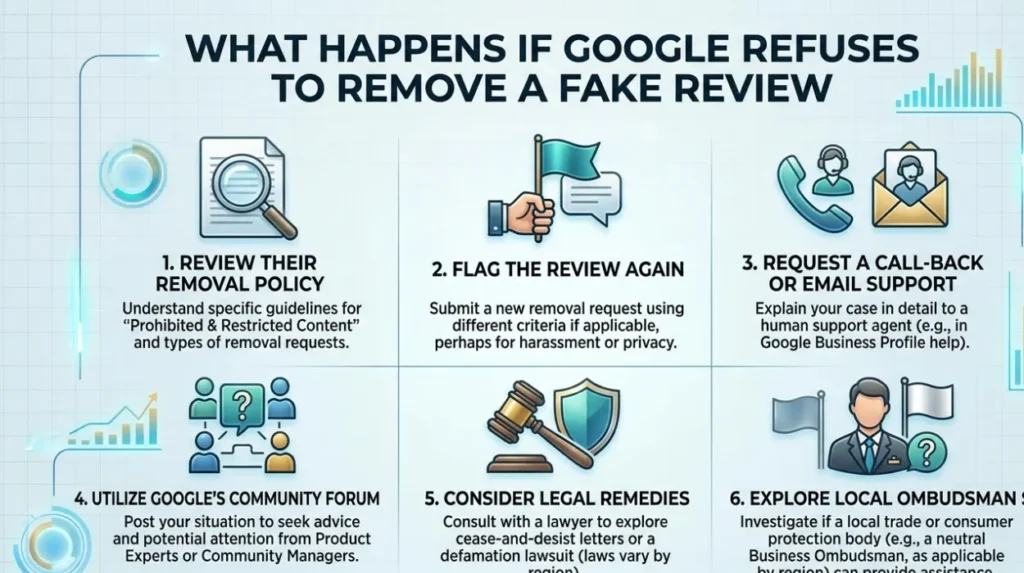
Google does not guarantee removal of a fake review, even if it appears misleading. The platform typically removes reviews only when they clearly violate its content policies, such as containing spam, hate speech, threats, or personal information. Negative or poorly written reviews are not automatically deemed fake or policy‑breaking, even if they harm your reputation.
When Google leaves a review in place, that review can continue to influence your overall star rating and reputation signals in search results. Studies on electronic word of mouth show that even a small number of negative reviews can reduce purchase intent, especially if they appear in the top‑position clusters. However, search‑reputation systems also respond to volume and consistency, so a single outlier has less impact than a sustained cluster of fake or misleading feedback.
If Google refuses removal but you can demonstrate that the review is demonstrably false or misleading, you may escalate the issue. UK consumer‑protection law and the CMA’s fake‑review rules allow you to highlight that the review is unlawfully misleading or incentivised, and businesses can ask platforms to reassess content when it breaches legal standards. In some cases, documenting evidence and engaging legal or regulatory channels can lead to reconsideration or voluntary withdrawal by the reviewer.
How should you respond professionally to a fake review
Even when a review is fake, how you respond shapes your reputation more than the review itself. Google’s Q&A and review‑response tools let you correct the record or clarify the facts without appearing defensive or combative. Professional responses protect your reputation signals and reassure potential customers that you take feedback seriously.
A strong professional response should:
- Address the reviewer directly, using neutral language, and state that the review appears factually incorrect. For example: “Thank you for your feedback. Our records indicate you did not book or receive this service, which may explain the discrepancies in your review.”
- Clarify your policies and standards if you cannot prove the review is fake. For example: “We take all reviews seriously and ensure our listings comply with UK consumer‑protection rules. If you have concerns, please contact us directly so we can resolve them.”
- Avoid emotional language, personal attacks, or insulting the reviewer, as this can damage your reputation and appear unprofessional in public view.
Professional responses signal that your business operates transparently and responsibly, which can offset the impact of a single fake or misleading review. This approach aligns with research on managing negative electronic word of mouth, which shows that constructive, calm responses boost perceived trustworthiness.
What prevention strategies work against fake Google reviews
Preventing fake Google reviews requires a structured reputation‑management strategy tailored to the UK legal and technical environment. The goal is to build a strong, authentic review‑signal profile so that occasional fake or misleading entries become statistically insignificant. Platform and legal‑compliance research shows that combining detection, policy, and transparency is the most effective way to reduce fake‑review risk.
Effective prevention strategies include:
- Encouraging genuine reviews: After a sale or service, invite satisfied customers to leave honest feedback on Google, but do not offer incentives that would create a concealed incentive under UK law. The CMA’s guidance makes clear that incentivised reviews must be disclosed, or they risk being banned as concealed incentivised reviews.
- Monitoring your listing: Use alerts or local‑SEO tools to detect sudden spikes in reviews or unusual patterns. Fake‑review‑detection frameworks emphasise that monitoring review history and clustering helps flag suspicious activity early.
- Maintaining an accurate profile: Ensure your Google Business Profile (GBP) is fully completed, with correct opening hours, descriptions, and contact details. Search‑reputation analyses show that complete, consistent profiles are interpreted as trustworthy by both search engines and users.
- Diversifying your review footprint: Encourage reviews on other reputable platforms, such as Trustpilot, TripAdvisor, or industry‑specific sites. A multi‑source review profile dilutes the impact of any single fake review on Google, improving overall reputation resilience.
These measures align with the CMA’s requirement that businesses take “reasonable and proportionate steps” to prevent and remove fake or misleading reviews.